
A new feature for namespacing CSS variables has been added in Angular v22.1. I’ll introduce how to use it here.
Namespaced CSS Variables
Namespacing CSS variables is a way to isolate CSS variables declared within an Angular application’s component CSS, preventing them from colliding with CSS variables from other applications or libraries. For example, common CSS variable names like --primary-color often collide with third-party UI libraries when used in an application. To avoid this, it is common practice to add a specific prefix to variable names to separate namespaces; this new feature automates that process.
Namespacing CSS variables is an opt-in feature, and existing behavior will not change unless it is enabled. To enable it, you add the provideCssVarNamespacing provider to the application configuration.
import { ApplicationConfig, provideBrowserGlobalErrorListeners } from '@angular/core';
import { provideCssVarNamespacing } from '@angular/platform-browser'; // ADD

export const appConfig: ApplicationConfig = {
  providers: [
    provideBrowserGlobalErrorListeners(),
    provideCssVarNamespacing(), // ADD
  ]
};
By default, variables are namespaced using the application’s APP_ID. For component CSS like the following, an --ng_ prefix is automatically inserted as shown in the image.
@Component({
  selector: 'app-root',
  template: `<p>Component Scope Text</p>`,
  styles: `
    :host {
      --text-color: blue;
    }

    p {
      color: var(--text-color);
    }
  `,
})
export class App {}

By passing an argument to the provideCssVarNamespacing function, you can also namespace using an arbitrary string.
export const appConfig: ApplicationConfig = {
  providers: [
    provideBrowserGlobalErrorListeners(),
    provideCssVarNamespacing('app'),
  ]
};
Using Global CSS Variables
When this namespacing is enabled, it might seem like you can no longer use or modify global CSS variables within component CSS, but a method has been provided for that as well.
For example, let’s say a --text-color variable is also declared in the global CSS. If nothing is done, the p tag inside the component will have the namespaced variable applied, so it won’t be affected by the global CSS and the color won’t change.
/* styles.css */

:root {
  --text-color: red;
}

p {
  color: var(--text-color);
}
When you want to reference a global --text-color variable from within a component, you can explicitly disable namespacing by using the dedicated --global prefix. When this prefix is present, namespacing is skipped, and the remaining part after removing the --global prefix is actually applied. Of course, you can override values as well as reference them.
@Component({
  selector: 'app-root',
  template: `
  <p>Component Scope Text</p>
  <p data-global>Component Scope Text (global)</p>
  `,
  styles: `
    :host {
      --text-color: blue;
      --global--text-color: green;
    }

    p {
      color: var(--text-color);
    }

    p[data-global] {
      color: var(--global--text-color);
    }
  `,
})
export class App {}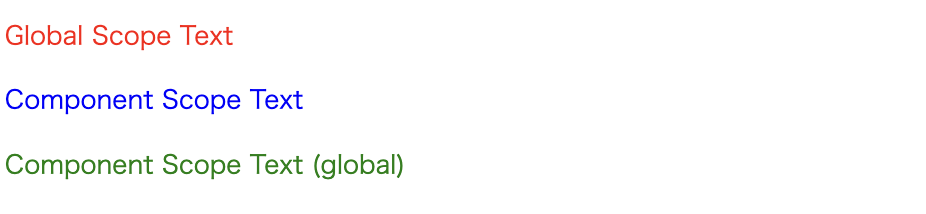
Caveats
By enabling namespacing, if CSS variables are used in design systems or similar built outside the application, you can incorporate them, and it’s guaranteed that using CSS variables inside the application won’t break the design system. It seems to me like a feature that should basically be enabled in projects that utilize CSS variables.
However, there is a caveat. As of v22.1.0, the insertion of CSS variable namespaces only applies to component CSS. In other words, values provided to style attributes within template HTML are not covered.
<!-- Reference the global --text-color -->
<p [style.color]="'var(--text-color)'">
If you want to use namespaced CSS variables within template HTML, you need to resolve them on the TypeScript side using the CssVarNamespacer service. By binding the return value resolved with the namespace method of CssVarNamespacer as shown below, you can apply namespacing to dynamic styling.
import { CssVarNamespacer } from '@angular/platform-browser';

@Component({
  selector: 'app-root',
  template: `
    <p [style.color]="'var(' + textColor + ')'">Component Scope Text (inline)</p>
  `,
  styles: `
    :host {
      --text-color: blue;
    }
  `,
})
export class App {
  // namespaced `--text-color`
  textColor = inject(CssVarNamespacer).namespace('--text-color');
}
Also, another point that might be easily misunderstood is that this namespacing is isolation at the application level, not the component level. It exists as a mechanism separate from View Encapsulation, which scopes component CSS; variables still affect components according to the parent-child relationship in the DOM tree, just as before. In fact, since being able to inject CSS variables across component boundaries in that way is meaningful, it’s not a flaw, but we should be careful not to confuse it with the behavior of namespacing.
Conclusion
CSS variable namespacing in Angular v22.1 is a practical improvement that can replace existing workflows (such as adding prefixes) while automatically avoiding variable collisions in component CSS. It can be introduced just by adding provideCssVarNamespacing(), and an arbitrary prefix can be specified if needed.
Furthermore, for cases where you want to reference or override global variables, an explicit bypass method via the --global prefix is available. On the other hand, at present, it is not automatically applied to inline styles in templates. In use cases involving template HTML, it is necessary to resolve them using CssVarNamespacer before use.
I think the benefits are greater for projects that make extensive use of CSS variables, so it’s worth trying it out on an opt-in basis.